Claude Code, Health & Nutrition, Consumer App
OliveOS: A Claude-Built Planner for Living the Mediterranean Diet
A Mediterranean diet operating system designed and built with Claude. It turns a research-backed eating pattern into eight weeks of planned meals, an olive oil target you can see every day, and a shopping list priced at the stores you actually use.
 OliveOS
- 01 Problem
The Mediterranean diet is easy to read about and hard to live. People need to know what to cook, hit a daily olive oil target, avoid eating the same five dishes, cook for a household with different diets, and shop on a budget.
- 02 Approach
A five-part app (Explore, Plan, Shop, Crew, and People & settings) built on a structured recipe and grocery data model, with a planner that follows nutrition rules, cuts waste and turns batch cooking into leftovers.
- 03 Outcome
One click plans two months of breakfasts, lunches, dinners and snacks from 62 dishes across 13 countries, tracks olive oil per day, and produces a priced, package-accurate shopping list for each week.
Project summary
OliveOS is the second case study in my Claude Code series. It's a full meal-planning app for the Mediterranean diet, designed and built through prompts with Claude and published as a Claude artifact. Its tagline sets the tone: "Runs on 4 tbsp of liquid gold a day."
The goal was to take a well-studied eating pattern and remove every reason people fall off it. What should I cook? Am I getting enough olive oil? What do I buy, and what will it cost? What if my partner is vegetarian? OliveOS answers each of those inside one app.
The problem
Diet advice usually stops at principles: eat more vegetables, legumes and fish, and use olive oil as your main fat. Living it takes planning that most people never do. Recipes come from a dozen sources, nothing tracks the olive oil target, shopping lists ignore what stores actually sell, and a household rarely eats the same way. The result is a good intention that fades by week two.
The concept: eat your way around the Mediterranean
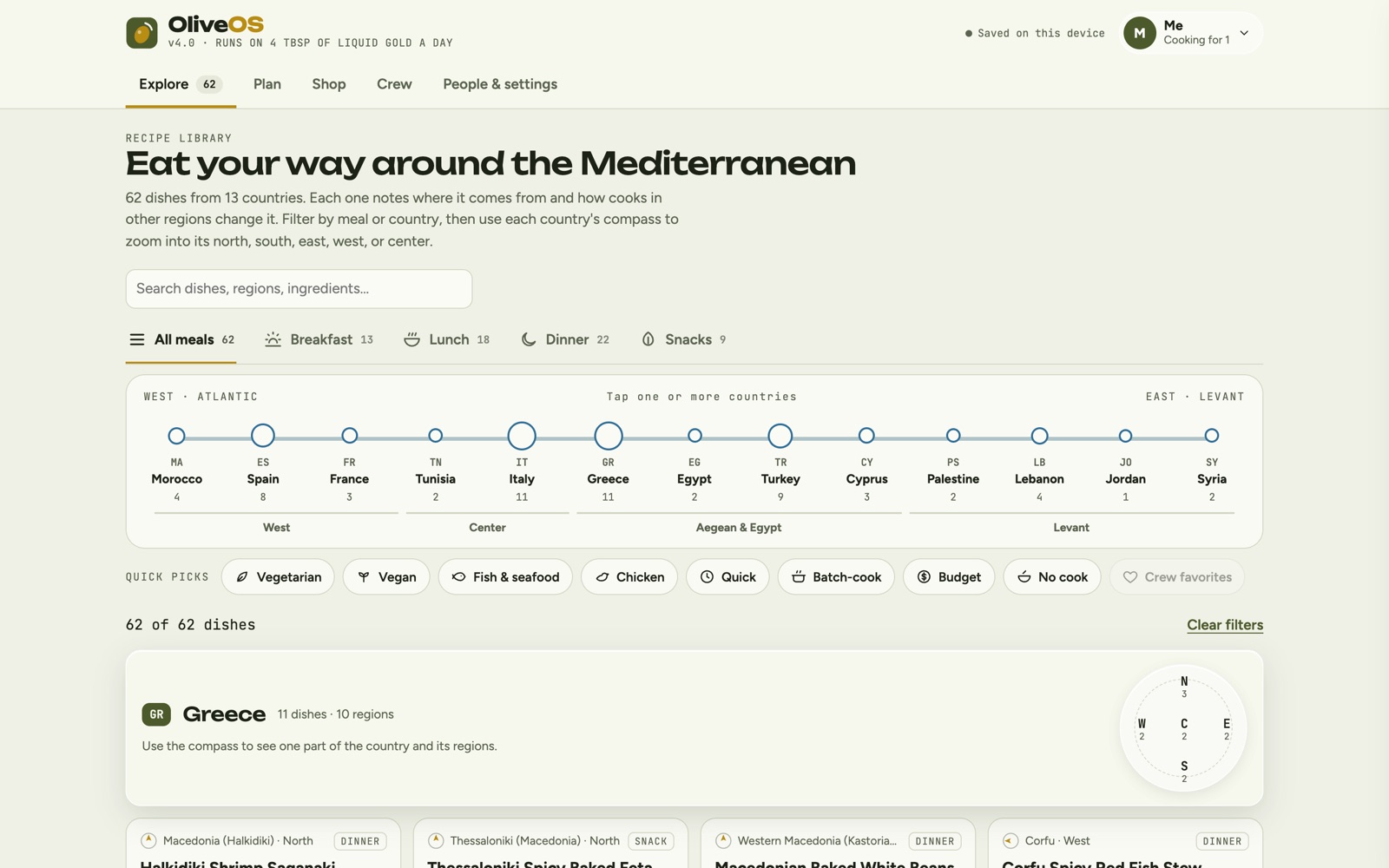
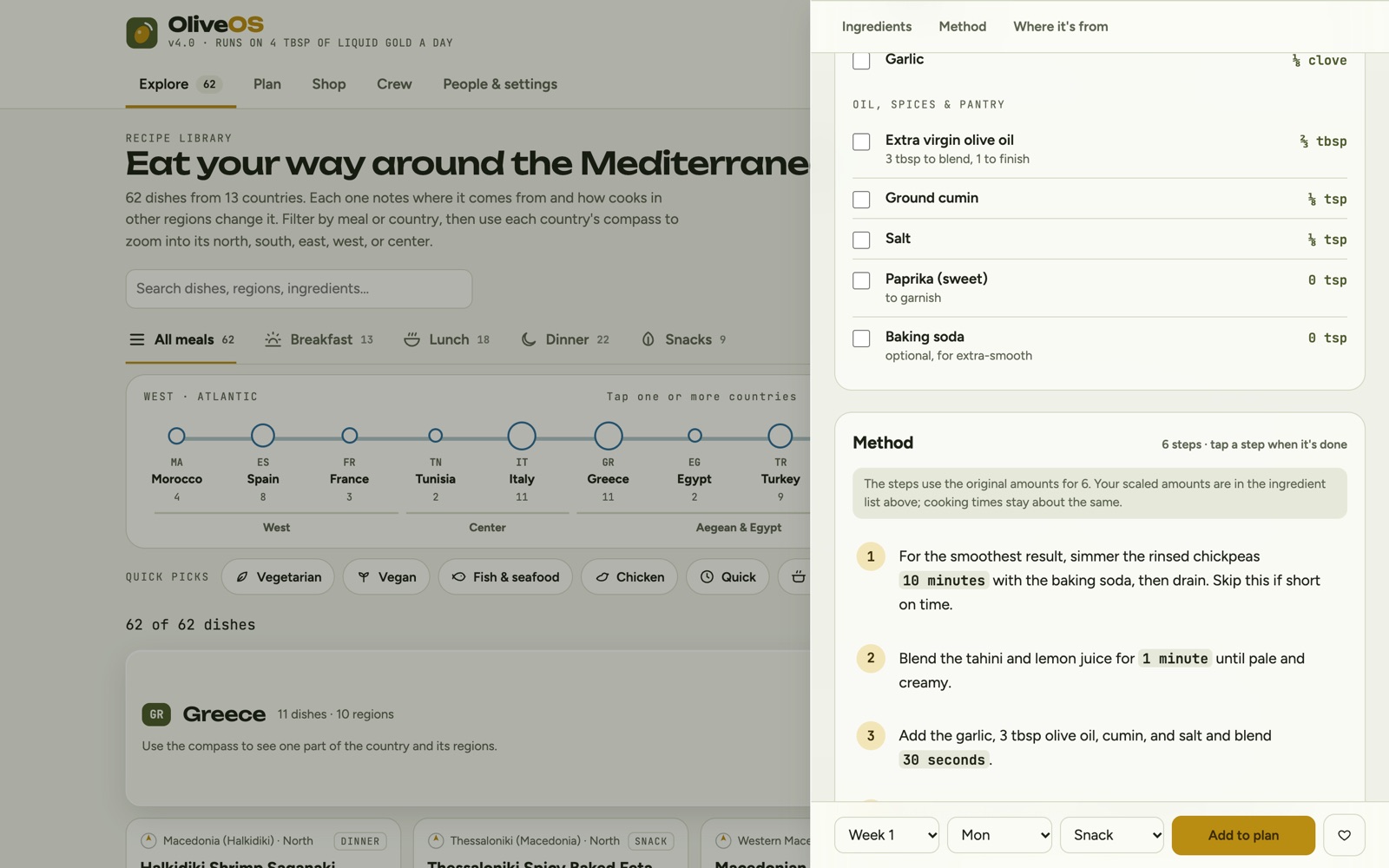
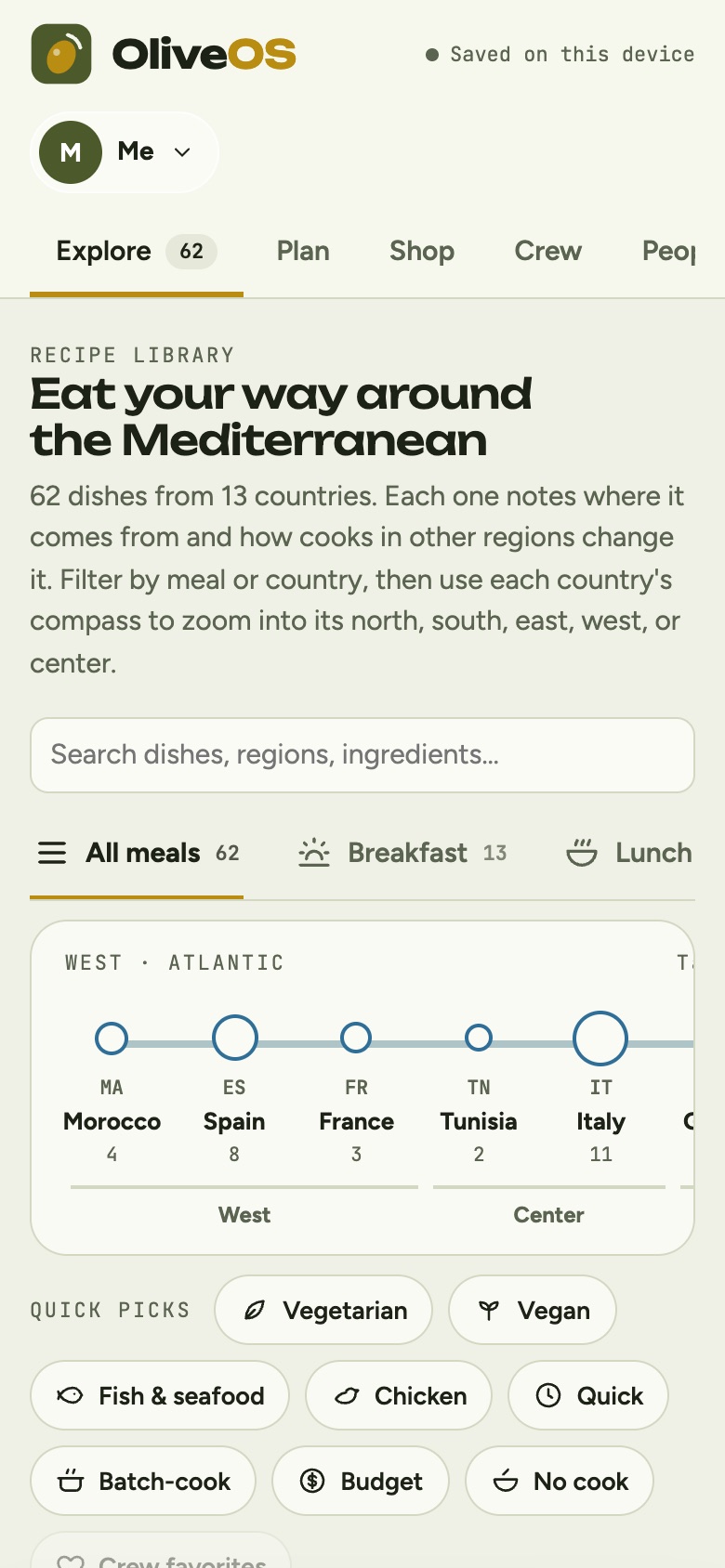
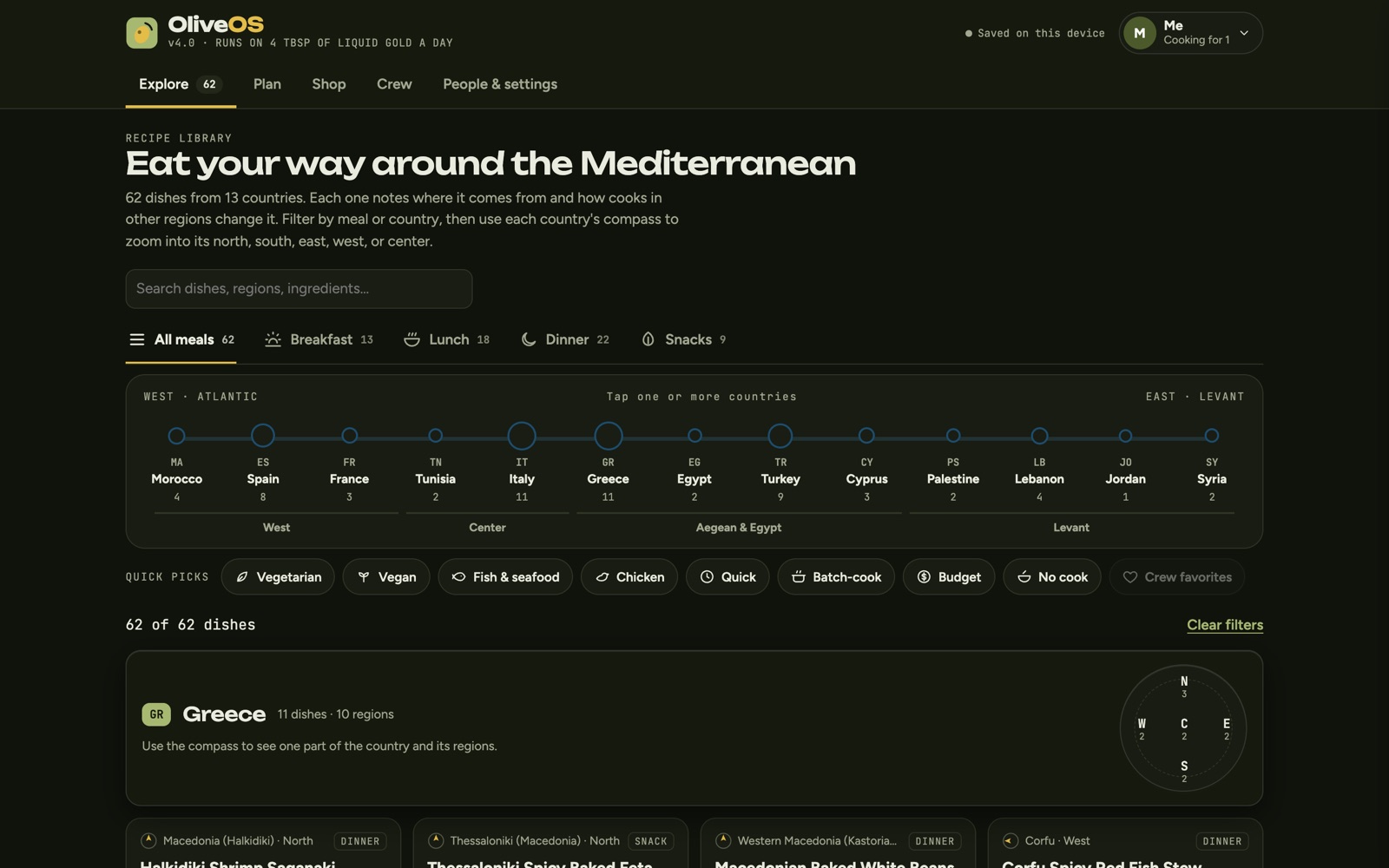
Rather than a clinical tracker, OliveOS is designed as a journey. The recipe library is organized as a trip from west to east, from the Atlantic coast of Morocco to the Levant, and each country opens with a compass that zooms into its north, south, east, west or center. The app is one shell with five tabs, so every task is one tap away, and a recipe opens in a side drawer (a bottom sheet on phones) without losing your place.
Explore: a library with a sense of place
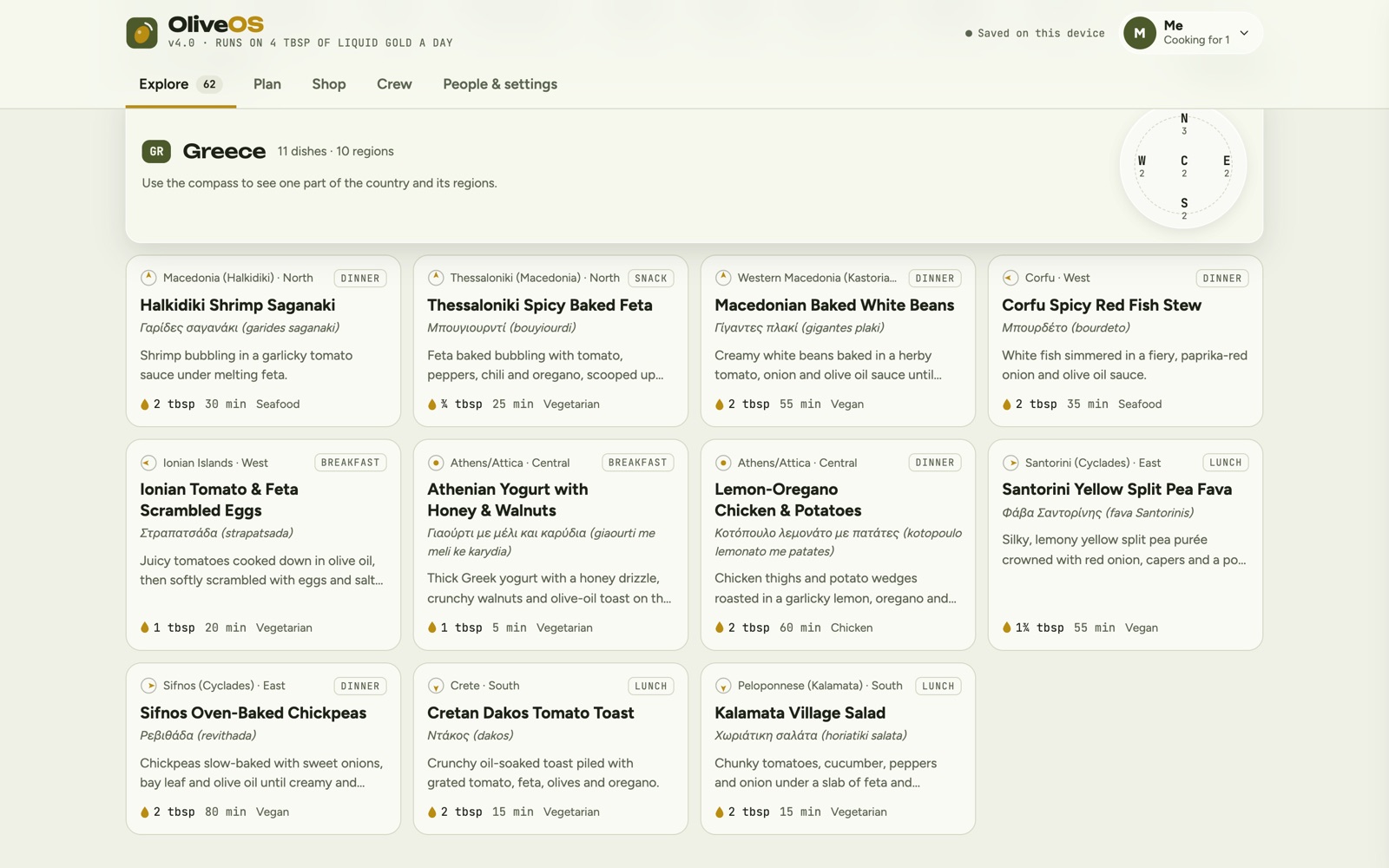
- 62 dishes from 13 countries, from Morocco, Spain and France through Italy, Greece and Turkey to Lebanon, Palestine, Jordan and Syria.
- A journey strip. Countries sit on a single line from west to east, grouped into West, Center, Aegean & Egypt and Levant, with a dish count under each. Tap one or more to filter.
- A compass for every country. Pick a direction to see dishes from one part of the country and the regions they come from.
- Meal tabs and quick picks. Breakfast, lunch, dinner and snacks, plus filters for vegetarian, vegan, fish and seafood, chicken, quick, batch-cook, budget, no-cook and crew favorites.
- Search across dishes, regions and ingredients.
Every recipe tells you where it's from
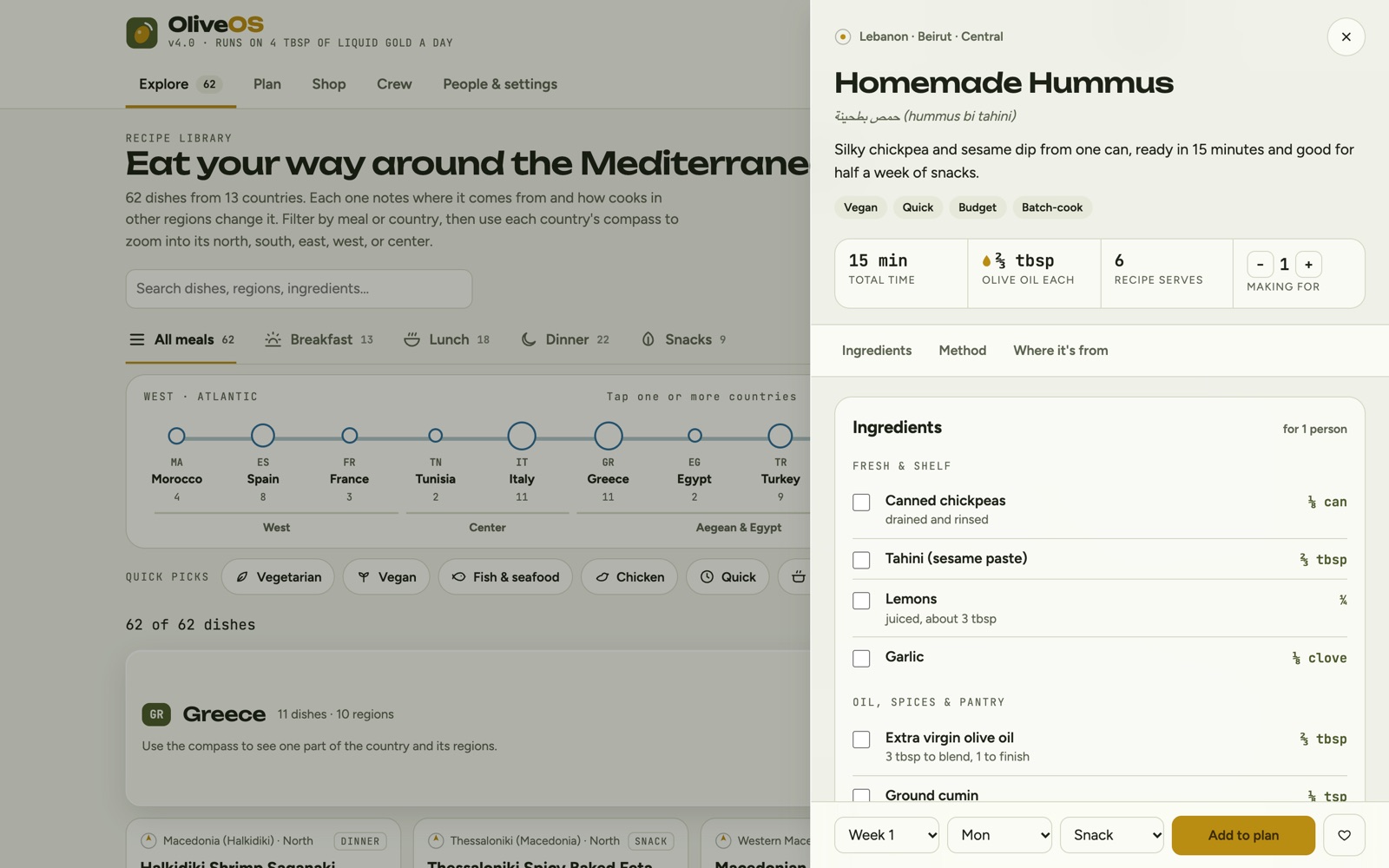
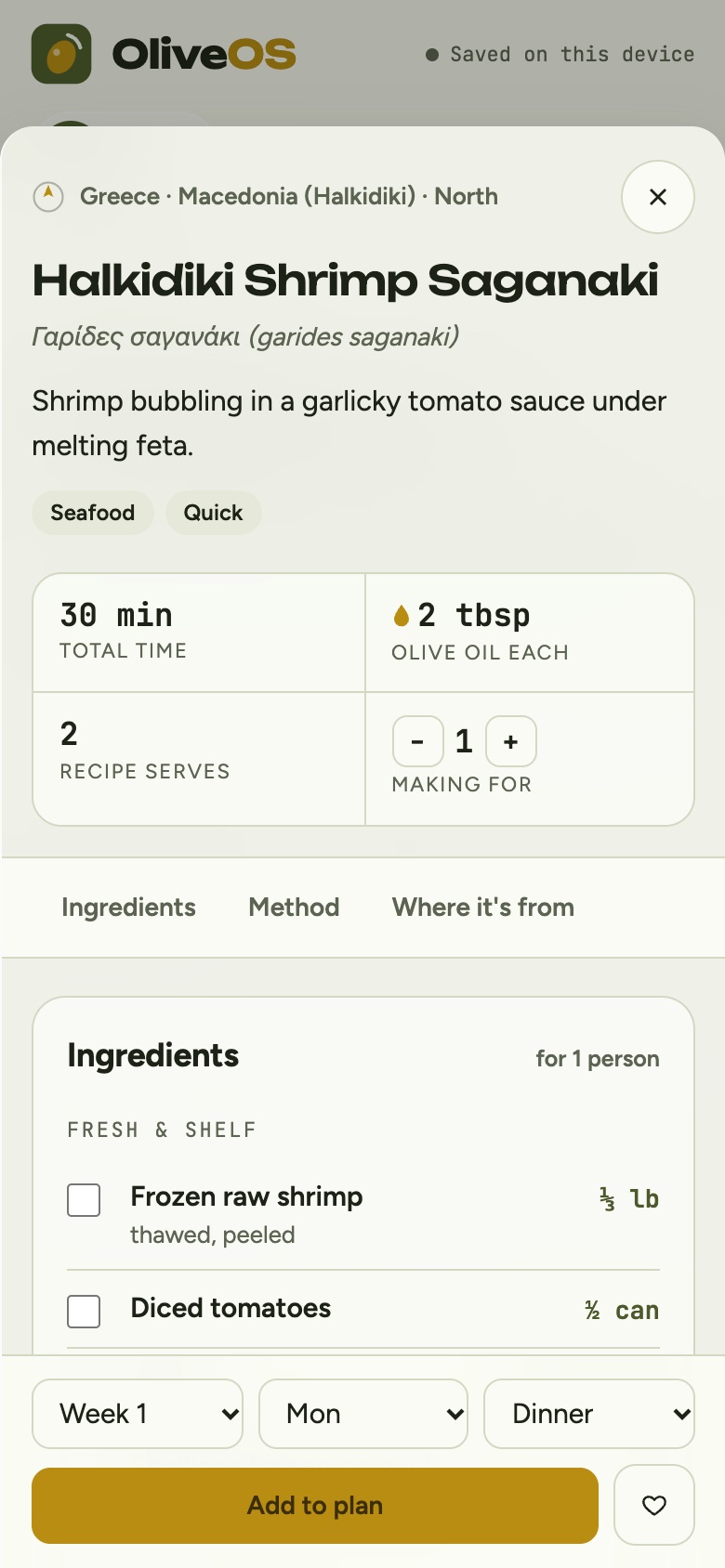
Each recipe carries its name in the original script (Arabic, Greek or Turkish, with a transliteration), the region it comes from, and a short regional story. A section called "How other regions make it" shows how cooks elsewhere change the dish, for example how hummus in Palestine is served warm with whole chickpeas, or how Damascus turns it into fatteh. Every dish has these variations.
The recipe itself is built for cooking, not reading. A header shows total time, olive oil per serving and servings, with a stepper to scale the recipe to the number of people eating. Ingredients are grouped into fresh and shelf items and oil, spices and pantry, and each one can be checked off. Steps are numbered and tap to complete, with times highlighted. A jump bar moves between Ingredients, Method and Where it's from, and a sticky footer adds the dish to any week, day and meal.
Plan: two months, one week at a time
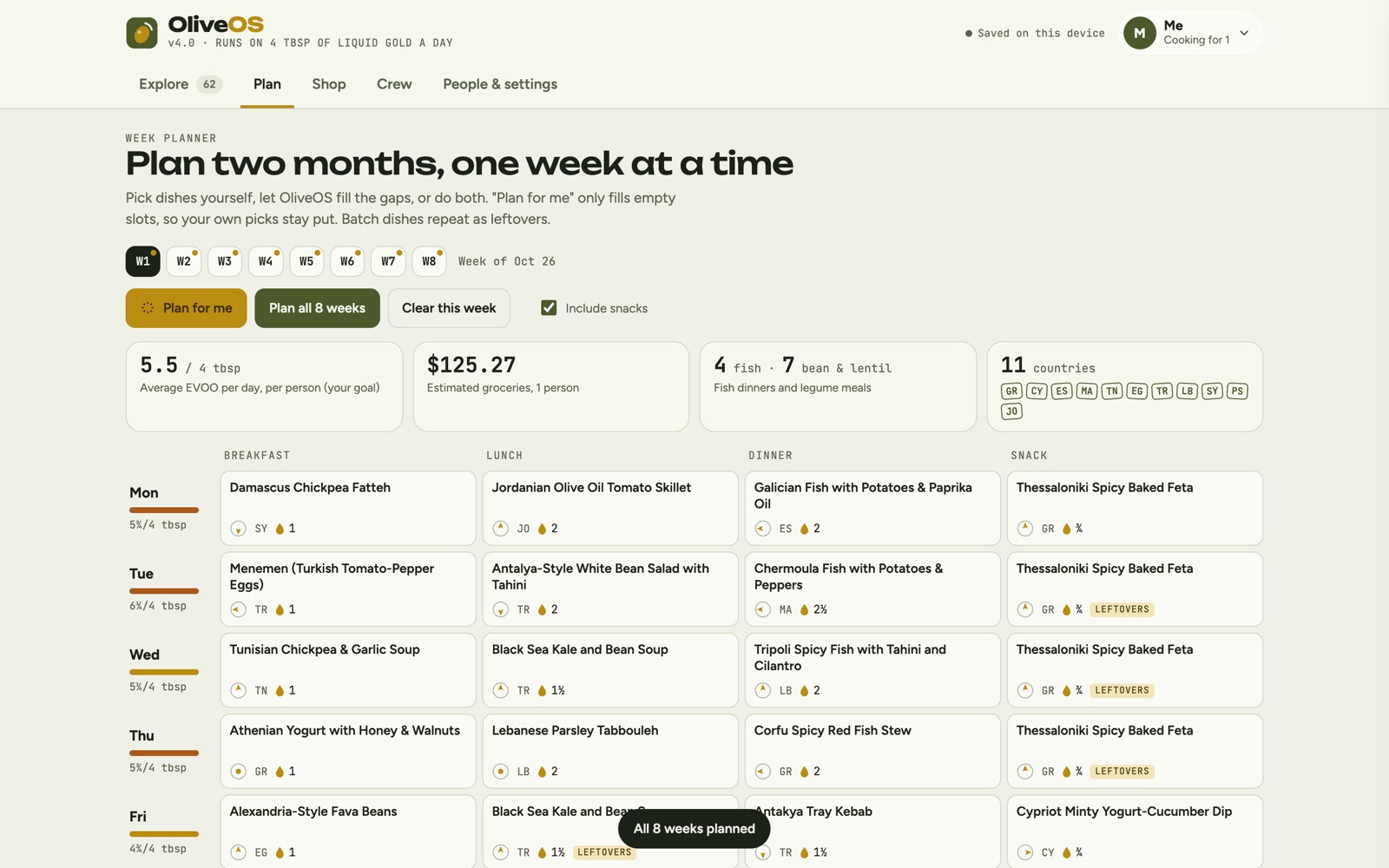
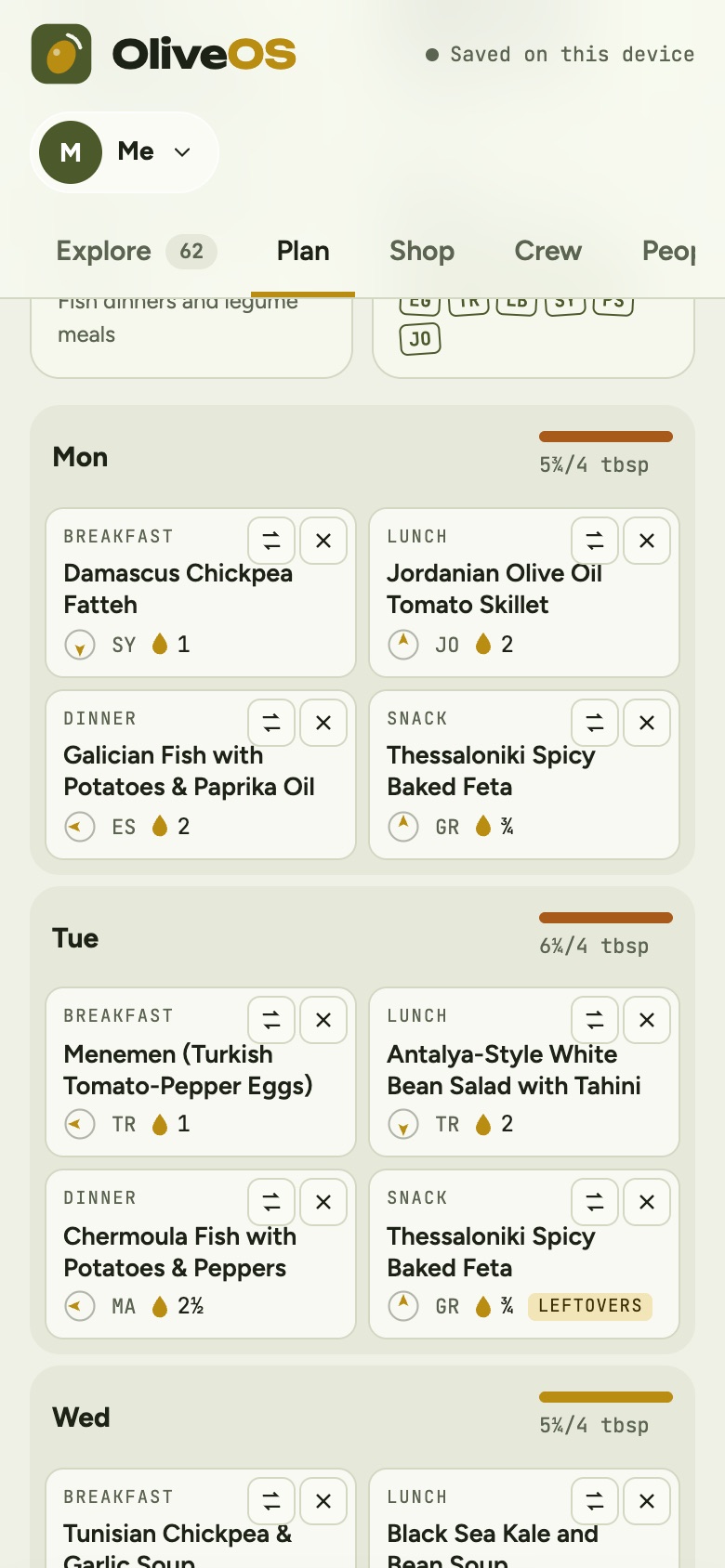
The planner covers eight weeks, with breakfast, lunch, dinner and an optional snack every day. Plan for me fills only the empty slots, so dishes you picked yourself stay put. Plan all 8 weeks builds two months at once. Behind those buttons, the planner follows a set of rules:
- Nutrition rules. At least two fish dinners and at most one red meat dinner each week.
- Variety. Dishes from the previous two weeks are discouraged, and dinners avoid repeating the same country two nights in a row.
- Less waste. Dishes that share ingredients with the rest of the week score higher, so a bunch of parsley gets used, not thrown out.
- Batch cooking. A dinner that serves four or more automatically becomes the next day's lunch, labeled as leftovers.
- Your preferences. It respects each person's diet and allergies, and leans toward their favorite countries without leaving the others out.
Every day shows an olive oil meter against your goal, which turns a different color when you go over. A summary row tracks the week: average olive oil per day, estimated groceries, fish and legume meals, and a "passport" of country stamps for everywhere you ate that week.
Shop: a list that matches the store
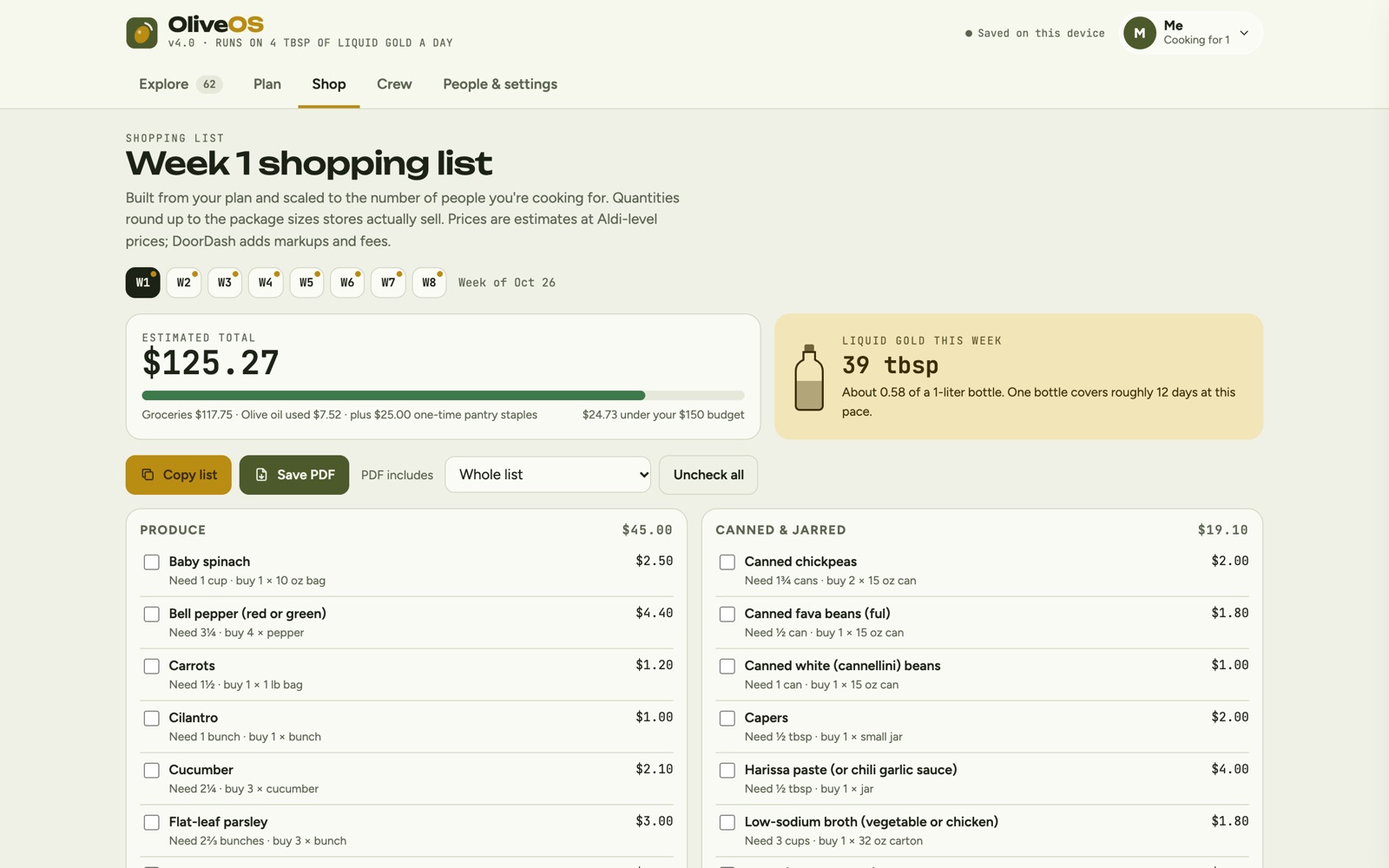
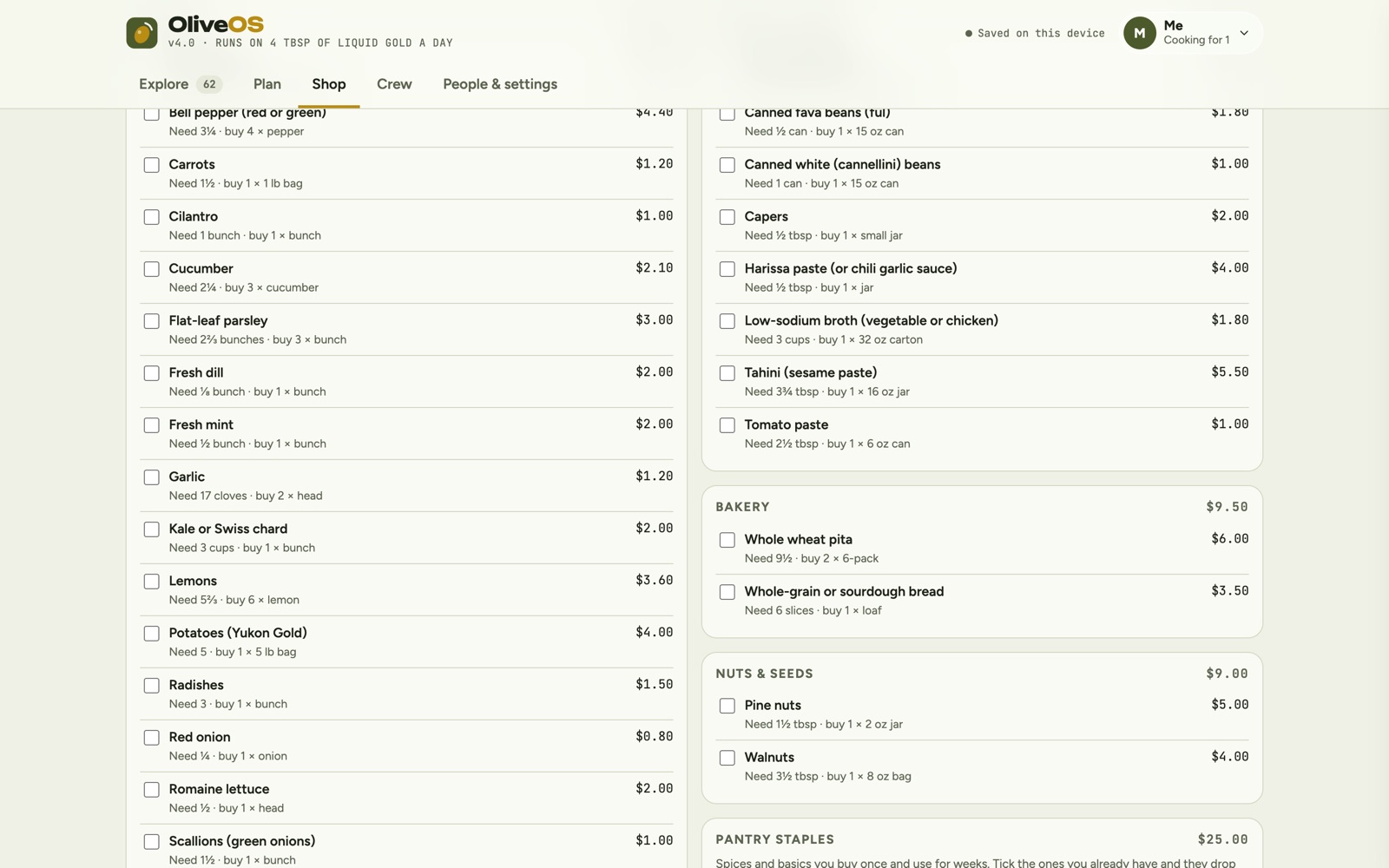
The shopping list builds itself from the week's plan and scales to the number of people you're cooking for. It rounds up to the package sizes stores actually sell, so it says "Need 1 3/4 cans, buy 2 15 oz cans" instead of a fraction you can't buy. Items are grouped by aisle with a subtotal for each, and pantry staples sit in their own section that only counts if you don't already have them.
- A budget meter. The estimated total is measured against your weekly budget, with groceries, olive oil and one-time pantry costs broken out.
- Store-aware pricing. Prices start at Aldi-level estimates and adjust for Marc's, Giant Eagle or Whole Foods, with an option to add about 20% for delivery app markups.
- Liquid gold this week. A dedicated card shows how many tablespoons of olive oil the week uses, how much of a 1-liter bottle that is, and how many days a bottle lasts at that pace.
- Take it with you. Check items off, copy the list, or save a PDF of the whole list, only the unchecked items or only the checked ones.
People, profiles and crew
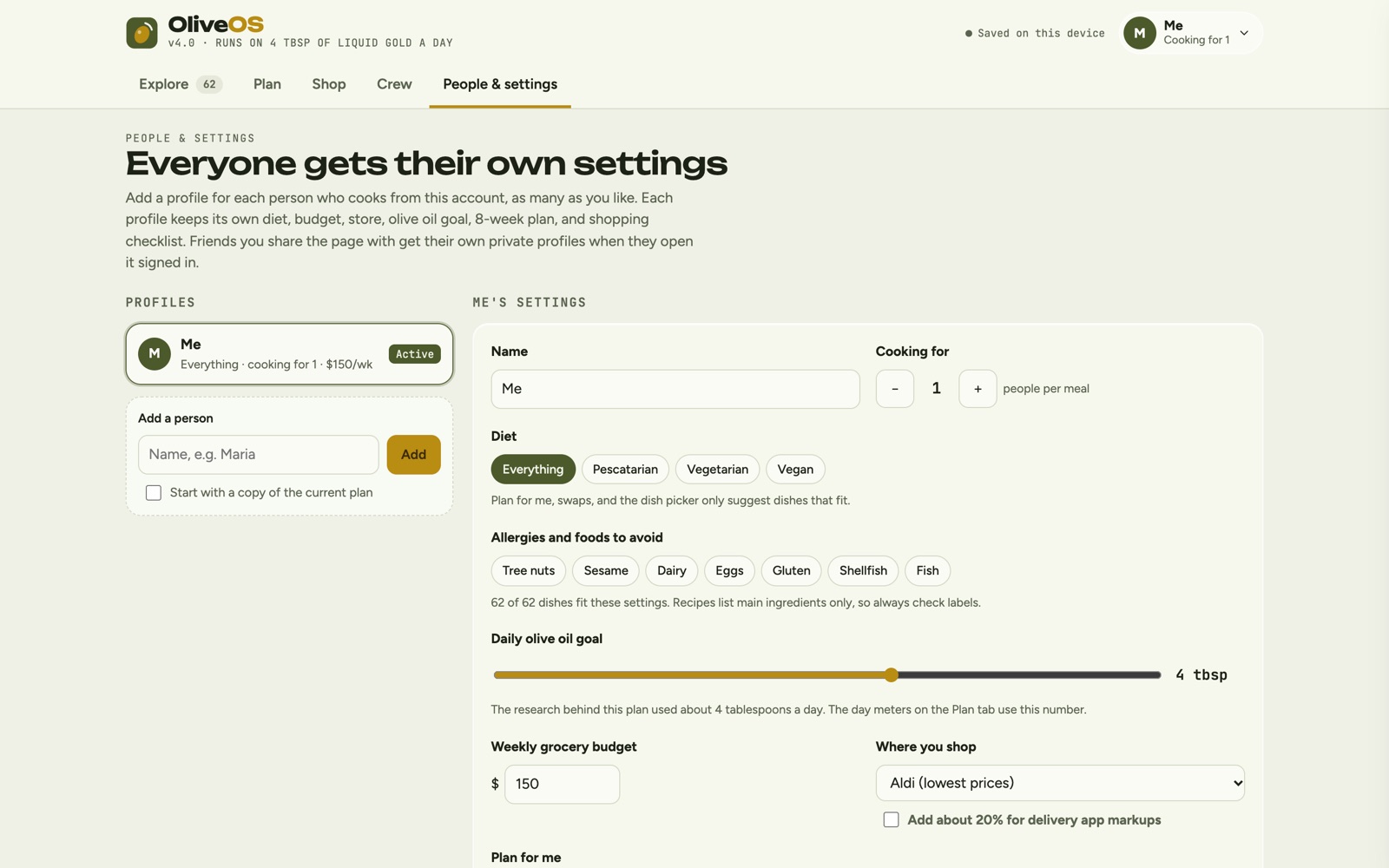
Every person who cooks from the account gets their own profile, with their own diet (everything, pescatarian, vegetarian or vegan), allergies and foods to avoid, number of people, olive oil goal, weekly budget, store, favorite countries, eight-week plan and shopping checklist. The planner, swaps and dish picker only suggest dishes that fit the active profile, and the app tells you how many of the 62 dishes match.
The Crew tab makes it social. Friends who open the page signed in to Claude can heart dishes, share a week with the whole crew, and copy a friend's shared week straight into their own planner. Each friend gets a private profile of their own.
Design system
OliveOS has its own visual language, separate from my portfolio's. The palette comes from the region: deep olive, olive oil gold, Mediterranean sea blue and a warm sun, set behind frosted glass surfaces. Unbounded gives the headlines a bold, modern voice, Figtree keeps body text readable, and JetBrains Mono sets every number, from cooking times to prices, so data always reads as data. Small touches carry the personality: olive oil drops beside every dish, a bottle on the shopping card, and passport stamps that tilt slightly like real ones.
It works in light and dark themes, and it's built mobile-first. On a phone the recipe drawer becomes a bottom sheet and the week grid becomes day cards. Keyboard focus is always visible, tabs use proper roles, and motion turns off for people who prefer reduced motion.
Built with Claude
I designed and built OliveOS by directing Claude through prompts, over several versions, and published it as a Claude artifact. That decision shaped the product:
- A structured data model. Each of the 62 recipes is structured data, with ingredients keyed to a grocery vocabulary that knows every item's aisle, unit, package size and price. That's what makes recipe scaling, package rounding and budget estimates possible.
- A rule-based planner. The planner is code, not guesswork. It scores every candidate dish against the nutrition, variety, waste and preference rules above.
- Artifact capabilities. The app uses Claude's artifact runtime for the features that need it: a shared database for the crew (friends can read the crew's shares but only change their own), the signed-in person's identity for private profiles and sync, and file downloads for PDF shopping lists.
- Graceful without an account. Opened without signing in, everything still works and saves on the device. Signing in adds sync and the crew.
The result is a product that would normally need a backend, a database and a team, built and iterated by one designer through conversation with Claude.
Why it matters
OliveOS turns a diet into a habit by removing the planning work that makes healthy eating hard: what to cook, how much olive oil, what to buy and what it costs. It's also a demonstration of how I work now. I define the experience, the rules and the data model, and I use Claude to build a complete, production-quality product.
Skills: Product Strategy, UX Design, Information Architecture, Data Modeling, Claude Code, Design Systems.